
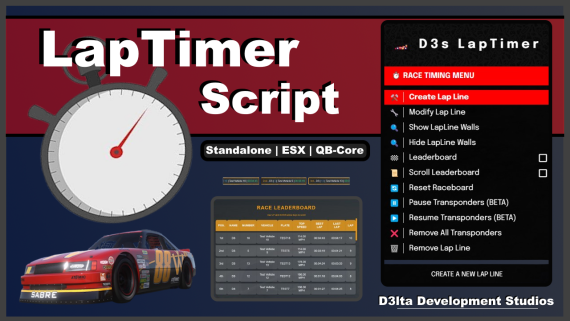
D3s LapTimer Script
Race timing system designed for FiveM Race RP Servers. This script helps track your time during races and shows rank positions in the leaderboard to keep the competition exciting!

Key Features:
Lap Line Creation and Management
- Create and Modify Lap Lines: Customize the length and width of your lap lines.
- Toggle Lap Line Walls: Enable or disable Lap Line Walls for a visual reference of lap line location.
- Remove Lap Lines: Delete existing lap lines.
- Blips: Automatically adds a lap line marker on the map.
Transponder System
- Unique Transponder Numbers: Assign numbers (1-999) to vehicles.
- Track Performance: Monitor lap times, best laps, last laps, and top speeds.
- Manage Transponders: Remove transponders individually or all at once (Admin).
Race Timing
- Lap Timers: Calculated by (Minutes : Seconds : Milliseconds)
- Record Times: Keep track of lap times and top speeds.
- Real-Time Updates: Display real-time lap times through the leaderboard
- Best Lap Recording: Chat announcement when accomplishing a new best lap time.
Leaderboard
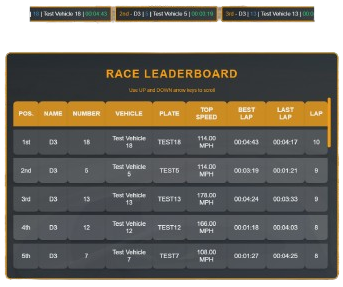
- Live Leaderboard: Logs player names, vehicle names, transponder numbers, best laps, last laps, lap counts, and top speeds.
- Ranking: Positioned Based! (Best Lap Time UI Coming Soon)
- Toggle Visibility: Show or hide the leaderboard for all players.
- Scroll Leaderboard: Add a scrolling UI leaderboard to the top of the screen
- Reset Data: Clear the leaderboard and transponder data.
Admin Menu
- MenuV Interface: Access admin management features through a menu. (ESX & QB Compatible)
- Toggle scroll leaderboard visibility for all players,
- Add, remove and adjust lap lines, visibility and their dimensions directly from the menu.
- Remove all attached transponders from all vehicles
- Reset the leaderboard stats
Admin Commands:
/laptimer : Opens the Lap Timer Management Menu.
/lapline : Creates the lap line at the player’s current location.
/reset_raceboard : Resets the race leaderboard and all transponders.
/scroll_leaderboard : Toggles the scrolling leaderboard for all players.
/pauserace
/resumerace
Public Commands:
/transponder [number] : Assign a transponder to your current vehicle (1-999).
/finishrace : Finish the race, remove the transponder, and submit results.
/raceboard : Toggle the visibility of the race leaderboard.
/scroll_leaderboard : Toggles the scrolling leaderboard for players.
### Add ACE permissions for LapTimer
# Grant permission to a specific Steam ID (replace with actual Steam license ID)
add_ace identifier.license:YourLicenseHere "LapTimer.use" allow
# Grant permission to the 'admin' group
add_ace group.admin "LapTimer.use" allow
# Optionally, grant permission to other groups
add_ace group.moderator "LapTimer.use" allow
add_ace group.superadmin "LapTimer.use" allow`

Installation Guide Included!
Join Our Discord
D3lta Development Studios
Consumer Policy
Usage Policy | Privacy Policy
Purchasing or obtaining any of our assets means you accept the Consumer Guidelines and Policy!
